The term “cloud” gets thrown around boardrooms and coffee shops alike, often reduced to a mere buzzword. But for modern businesses and aspiring tech professionals, it is the fundamental architecture of the digital future. If you are standing on the edge looking up, wondering how to make the leap, you have arrived at the right place.
At cloudandbeyond.tech, we believe clarity precedes mastery. This guide isn’t just about defining terms; it’s about framing the cloud in a way that makes intuitive sense, specifically through the lens of the industry leader, Microsoft. Whether you are a total novice or an on-premises expert looking to pivot, let’s demystify the computing model that is reshaping our world.
1. De-mystifying the Metaphor: What Actually Is Cloud Computing?
Strip away the marketing hype and the complex diagrams for a moment. In its purest form, cloud computing is the delivery of computing services—including servers, storage, databases, networking, software, analytics, and intelligence—over the internet (“the cloud”).
“There is no cloud. It’s just someone else’s computer.”
You have likely heard that old IT adage. While technically true, it is massively reductive. It’s like saying a modern skyscraper is just “stacked bricks.” The cloud is not just renting someone else’s server; it is accessing immense, industrial-grade computing power on-demand, and only paying for what you use.
Think about electricity. When you flip a light switch at home, you don’t need to know how the power plant operates, nor do you have to maintain a generator in your backyard. You just use the service and pay a utility bill at the end of the month. Cloud computing is that utility model applied to IT infrastructure.
The Essential Service Models (The Pizza Analogy)
To truly grasp the cloud, you must understand how it’s delivered. This is where beginners often get lost in acronyms. The easiest way to visualize the difference between Infrastructure (IaaS), Platform (PaaS), and Software (SaaS) is the classic “Pizza as a Service” analogy.
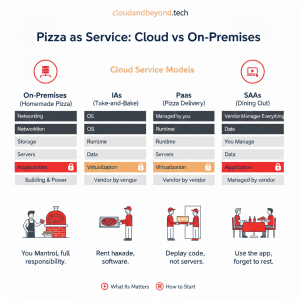
- On-Premises (Homemade Pizza): You do everything. You buy the ingredients, make the dough, own the oven, bake it, and serve it. You are responsible for the entire stack.
- IaaS – Infrastructure as a Service (Take-and-Bake): You rent the fundamental building blocks. The vendor provides the networking, storage, and servers (the kitchen and oven). You bring the OS, data, and applications (the pizza) and manage them. Example: Microsoft Azure Virtual Machines.
- PaaS – Platform as a Service (Pizza Delivery): You focus only on the toppings. The vendor manages the hardware and the operating system. You just bring your code and data. This is the developer’s dream state. Example: Azure App Service or Azure SQL Database.
- SaaS – Software as a Service (Dining Out): Everything is managed for you. You just show up and eat the pizza. You use the software via a web browser, and the vendor handles everything underneath. Example: Microsoft 365 (formerly Office 365) or Outlook.com.
Understanding these distinctions is vital because it dictates how much control you retain versus how much management overhead you offload to the provider.
2. Beyond the Hype: Why Does This Matter?
Why are organizations aggressively shutting down their own data centers and migrating to the Microsoft Cloud? It is rarely just about “saving money.” While cost optimization is a benefit, the real drivers are agility and capability.
The Speed of Innovation
In the old world, deploying a new application meant procurement requesting budget for new servers, waiting weeks for delivery, racking and stacking hardware, installing operating systems, and finally, weeks later, deploying code. In the cloud, a developer can spin up thousands of virtual machines or a complex database cluster in minutes with a few clicks in the Azure Portal. This speed means faster time-to-market for new ideas.
Elasticity and Scalability
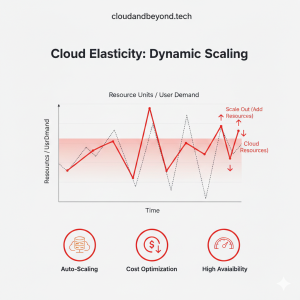
Imagine running an e-commerce site. On Black Friday, your traffic might spike 500%. If you rely on physical servers, you have to buy enough hardware to handle that one-day peak, meaning those servers sit idle the other 364 days of the year. That is wasted capital.
The cloud is “elastic.” It can automatically add more resources when demand spikes and shrink back down when traffic normalizes. You only pay for the resources you use during that spike.
Enterprise-Grade Security
This is counter-intuitive for many beginners. How can my data be safer on someone else’s computer? Consider this: Microsoft spends over $1 billion USD annually on cybersecurity alone. They employ thousands of the world’s top security experts to guard their data centers.
Unless your organization has a similar budget and talent pool, it is highly probable that your data is physically safer in a Microsoft Azure data center than in a server closet down the hall. The cloud shifts security responsibility, allowing you to focus on securing your applications while Microsoft secures the physical infrastructure.
3. Your Roadmap: How to Start Your Cloud Journey
The hardest part is often just beginning. The ecosystem is vast, and it’s easy to get overwhelmed by the sheer number of services available. Here is a practical, low-friction roadmap to getting started, specifically within the Microsoft ecosystem.
Step 1: Get Hands-On immediately
Reading is good; doing is better. You cannot learn swimming by reading a book about fluid dynamics. Fortunately, Microsoft removes the barrier to entry.
Go create a free Azure account. They provide substantial credits for the first month and, crucially, keep many popular services free for 12 months. This is your sandbox. Don’t be afraid to break things here; it’s how you learn.
Step 2: Master the Fundamentals (AZ-900)
If you want structured learning, aim for the Microsoft Certified: Azure Fundamentals (AZ-900) certification. Even if you don’t sit for the actual exam, studying the curriculum is the best way to ensure you understand the core concepts, terminology, and basic services without gaping holes in your knowledge.
Step 3: Build a “Hello World” Project
Don’t just click around randomly. Define a small project to build. Here are two beginner-friendly ideas:
- The IaaS Route: Deploy a Windows or Linux Virtual Machine. Log into it using Remote Desktop or SSH. Install a simple web server on it. You have just built your first cloud server.
- The PaaS Route (Recommended): Create a simple HTML “Hello World” file on your local computer. Use Azure App Service to deploy that file to a live public URL. You will be amazed at how quickly you can have a live website running without managing a single server.
Finally
Cloud computing is a journey, not a destination. The technology evolves rapidly, but the fundamental concepts we covered here remain constant. By understanding the service models and the business drivers behind them, you are already ahead of the curve.
Stay curious, keep experimenting in your Azure sandbox, and continue following cloudandbeyond.tech as we dive deeper into specific Azure services and architectural patterns in upcoming posts.